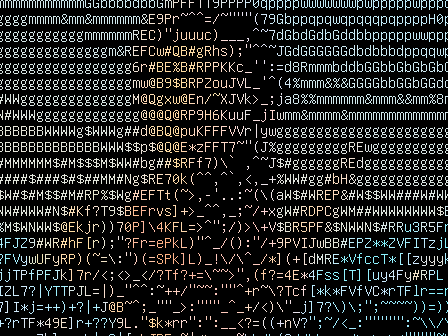
An OBS Studio plugin that redraws any video source as a live grid of characters.

Four filters, ten looks, and motion controls that run from a locked, still grid to a deliberately boiling one. Free and open source.

OBS 33+WINDOWSLINUXGPL-2.0

Live demo

FILTER
LOOK
SOURCE
CELLS
LOADING

This preview is a WebGL port of the plugin’s own passes (scoring, colors, Hold, Boil, Settle, Auto levels), running in your browser at your screen’s size. In OBS it runs on the source at its full resolution. Drag across the picture to compare with the original. Your camera and files stay on your device. Footage: Spring (2019) by Andy Goralczyk, © Blender Foundation, CC BY 4.0; cut and cropped.

01 / FILTERS

Four ways to draw

Each drawing mode is its own video filter. They all use the same font, an 8×16 console face, and choose each cell’s character by scoring every glyph in the set against the picture.

  • An ordinary OBS filter. It goes on any source, scene or group and stacks with your other filters.
  • Every instance keeps its own settings, so one scene can mix Ink on a camera with Console on a capture.
  • Character sets: Blocks, Lines, ASCII, every glyph in the font, or your own characters.

02 / MOTION

Locked or boiling

A live camera’s sensor noise makes naive character art crawl. These settings, shared by all four filters, decide how the grid changes from frame to frame.

SOFTEN
Blurs the source a little before sampling, removing noise at its source without holding back real motion.
HOLD
A cell keeps its glyph unless a better one wins by a clear margin. From no hold to almost locked.
SETTLE
Blends each cell’s colors with the previous frame, calming color flicker separately from glyph changes.
BOIL
Deliberate glyph swaps, independent of the image, from an occasional flicker up to four swaps per cell per second.
BOIL SPREAD
How far a swap may stray from the best glyph: low keeps the picture readable, high turns into static.
BOIL LINGER
How many frames a swapped glyph stays: one is a flicker, longer is a crawl.
LIGHT JUMP
When most of the picture changes brightness at once (a scene switch, lights on), every cell picks fresh. Watch the demo’s cuts.

03 / LOOKS

Ten looks

A look sets the characters, motion and the filter’s own settings in one go. Change anything and it becomes Custom; pick the look again to get it back. These are the plugin’s own output at 1:1, after 30 frames.

Stills: Spring (CC BY 4.0), Victor from Cosmos Laundromat and the Sintel poster (CC BY 3.0), all © Blender Foundation. Credits in the repository’s ATTRIBUTION.md.

04 / INSTALL

Install

Glyphnotic 1.0.0 needs OBS Studio 33.0.0 or later. Close OBS before installing. Every file is on the GitHub release, with SHA-256 checksums in its notes.

Windows

WINDOWS 10/11 · X64

  1. Run the installer. It installs for all users into C:\ProgramData\obs-studio\plugins\glyphnotic\.
  2. Or unzip the zip into C:\ProgramData\obs-studio\plugins\. For portable OBS, unzip it into the plugins folder inside OBS’s own folder.

The installer isn’t code-signed. If SmartScreen stops it, choose More info → Run anyway, or use the zip.

Linux

X86_64

Ubuntu 26.04 LTS and current Debian, with OBS 33 from OBS’s PPA:

sudo apt install ./glyphnotic-1.0.0-linux-x86_64.deb

Other distributions, per user:

mkdir -p ~/.local/share/obs-studio/plugins
tar -xJf glyphnotic-1.0.0-linux-x86_64.tar.xz -C ~/.local/share/obs-studio/plugins

macOS

UNIVERSAL · MAY WORK

Built with every release but not tested. It installs for the current user into ~/Library/Application Support/obs-studio/plugins/.

Reports are welcome in the issue tracker.

Then: start OBS, right-click a source → Filters → + → a Glyphnotic filter, and pick a Look. Tools → Plugin Manager lists Glyphnotic with its version.

Uninstalling, upgrading and the exact plugin paths: INSTALL.md. Building from source: BUILDING.md.

05 / COST

Light on the GPU

Every pass runs on the GPU; the CPU only sets them up. Measured with OBS’s source profiler on a 1920×1080 source.

1.3 MSper frame for an Ink look on ASCII
1.2 MSfor Mosaic, Poster and Console
4.0 MSfor Every Glyph, 503 characters (1.5 ms at cell scale 2×)

On an NVIDIA RTX 4070 Ti, Direct3D 11. A 60 fps frame lasts 16.7 ms. Method and more cases: PERFORMANCE.md.

06 / SUPPORT

Free, and open

Glyphnotic is free software under the GPL. If it’s useful to you, you can support its development on Ko-fi.